DealerTrack Payment Workflow: Demo Screenshots From Inside the DMS
See how Anchorbase works alongside DealerTrack to route terminal payments, accept phone payments, send e-invoices, handle surcharge logic, and write payment data back to the DMS.

Integrated Payments Experts
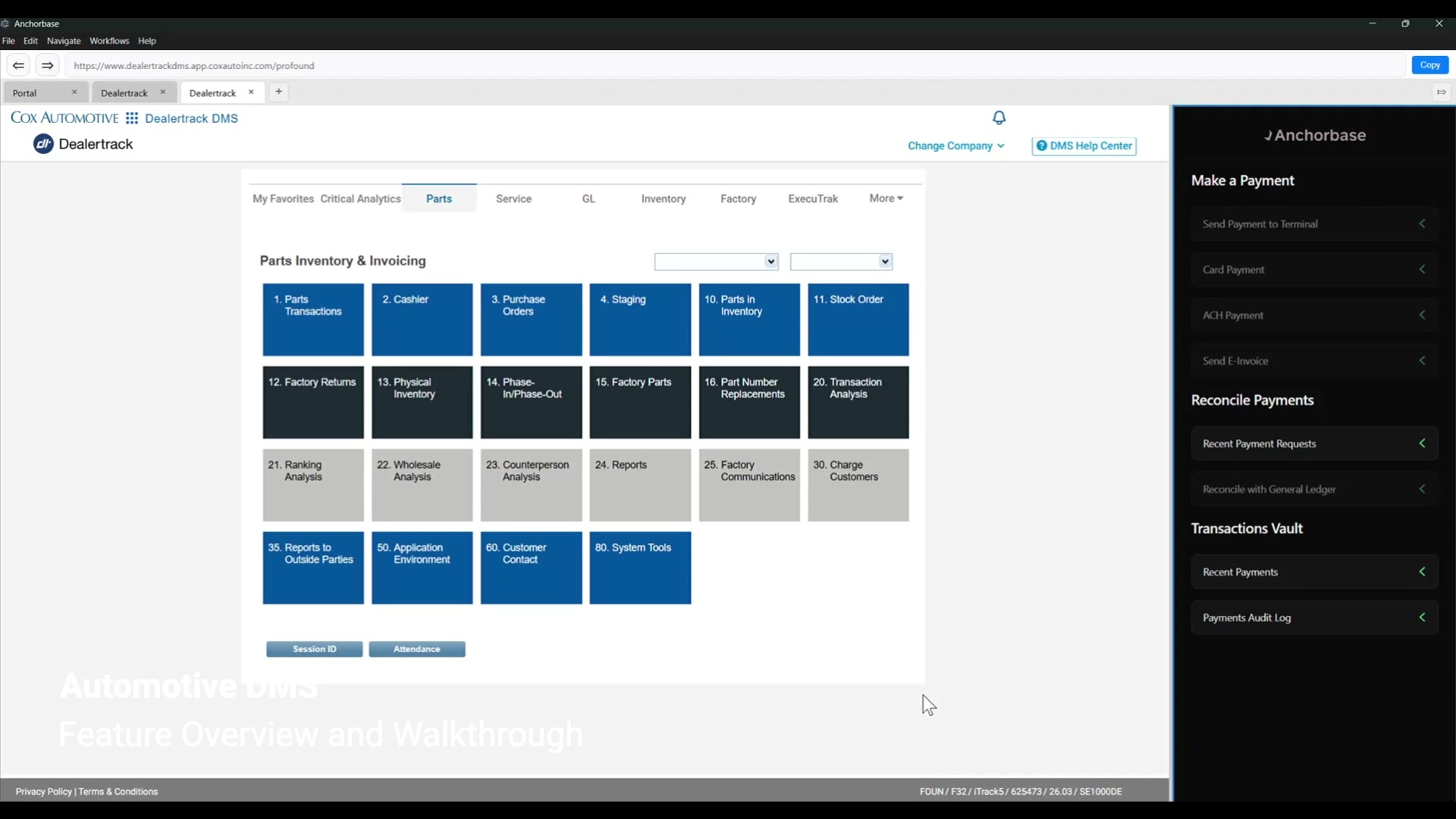
DealerTrack is where many dealership teams already work. Cashiers, service advisors, parts counters, and accounting teams use the DMS to find repair orders, close invoices, and post transactions back to the general ledger.
The problem is that customer payment expectations have moved faster than most DMS payment workflows. Customers want to pay by terminal, by phone, by ACH, by emailed invoice, or through a secure online payment page. Dealerships want those payments to stay tied to the right RO, customer, department, payment method, surcharge setting, approval number, and GL workflow.
Anchorbase adds that modern payment layer directly alongside DealerTrack. The employee keeps working in the DMS. Anchorbase handles the payment experience, surcharge logic, receipt options, notifications, and reconciliation/writeback.
The workflow starts inside DealerTrack
In the demo, the cashier opens DealerTrack and selects the RO or invoice that needs to be paid. Once the invoice is selected, the Anchorbase sidebar activates.
That sidebar becomes the payment control center for the transaction. It pulls the amount, customer information, and RO number from the DMS so the employee does not have to manually re-key the same details into a separate terminal, browser window, or processor portal.
From there, the employee can choose the right payment path:
- Send payment to a physical terminal
- Accept a card payment over the phone
- Accept ACH from a checking or savings account
- Send an e-invoice by email or SMS
- Review payment requests, logs, and recent payments
- Reconcile paid transactions back to the general ledger
That matters because dealership payments are not one workflow. A customer at the parts counter, a service customer standing in the lane, and an accounts receivable customer paying remotely all need different payment experiences. The DMS record still needs to end up clean.
Send a DealerTrack invoice to any terminal
For an in-person transaction, the employee chooses "Send to Terminal." Anchorbase shows the transaction amount, customer, and RO number, then lets the employee choose which physical device should receive the payment.
In a dealership, that device flexibility matters. A parts counter terminal, a cashier terminal, and a service lane terminal may all belong to different physical workflows. Anchorbase lets the employee route the DealerTrack transaction to the right device without rebuilding the invoice manually.
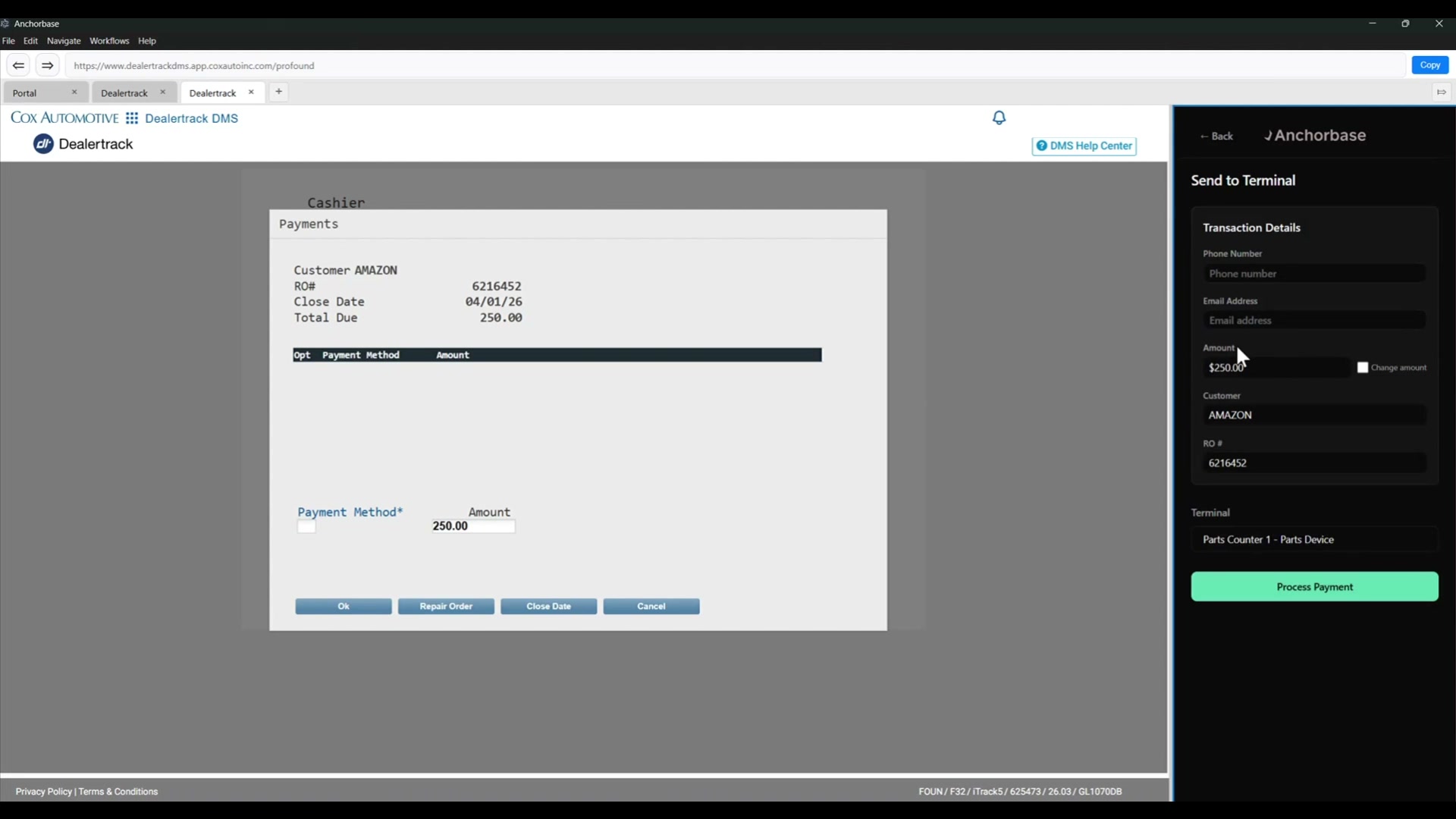
The customer pays on the terminal. The dealership keeps the transaction connected to the original RO or invoice.
Accept card payments over the phone
For card-not-present payments, the employee can open the card payment flow in the Anchorbase sidebar. The same DealerTrack transaction details carry forward: amount, customer, and RO number.
Anchorbase can also support surcharge logic based on the dealership's configuration. If surcharge is enabled, credit transactions can include the surcharge while debit transactions are handled differently according to the applicable rules. That is critical because the user should not have to manually decide whether a card qualifies.
The demo also shows permission-based surcharge removal. If the dealership allows certain users to remove surcharge on card-not-present transactions, Anchorbase can expose that option in the sidebar.
How Anchorbase Handles This
The payment logic lives inside Anchorbase, while the dealership employee still works from the DealerTrack transaction they already selected. That keeps the user experience simple without pushing compliance and reconciliation decisions onto front-line staff.
Write payment details back to DealerTrack
Once the transaction is approved, Anchorbase shows the live payment status and prepares the relevant payment details for the DealerTrack workflow.
In the demo, the payment flow tracks:
- Payment method
- Base transaction amount
- Approval number
- Transaction context tied to the RO or invoice
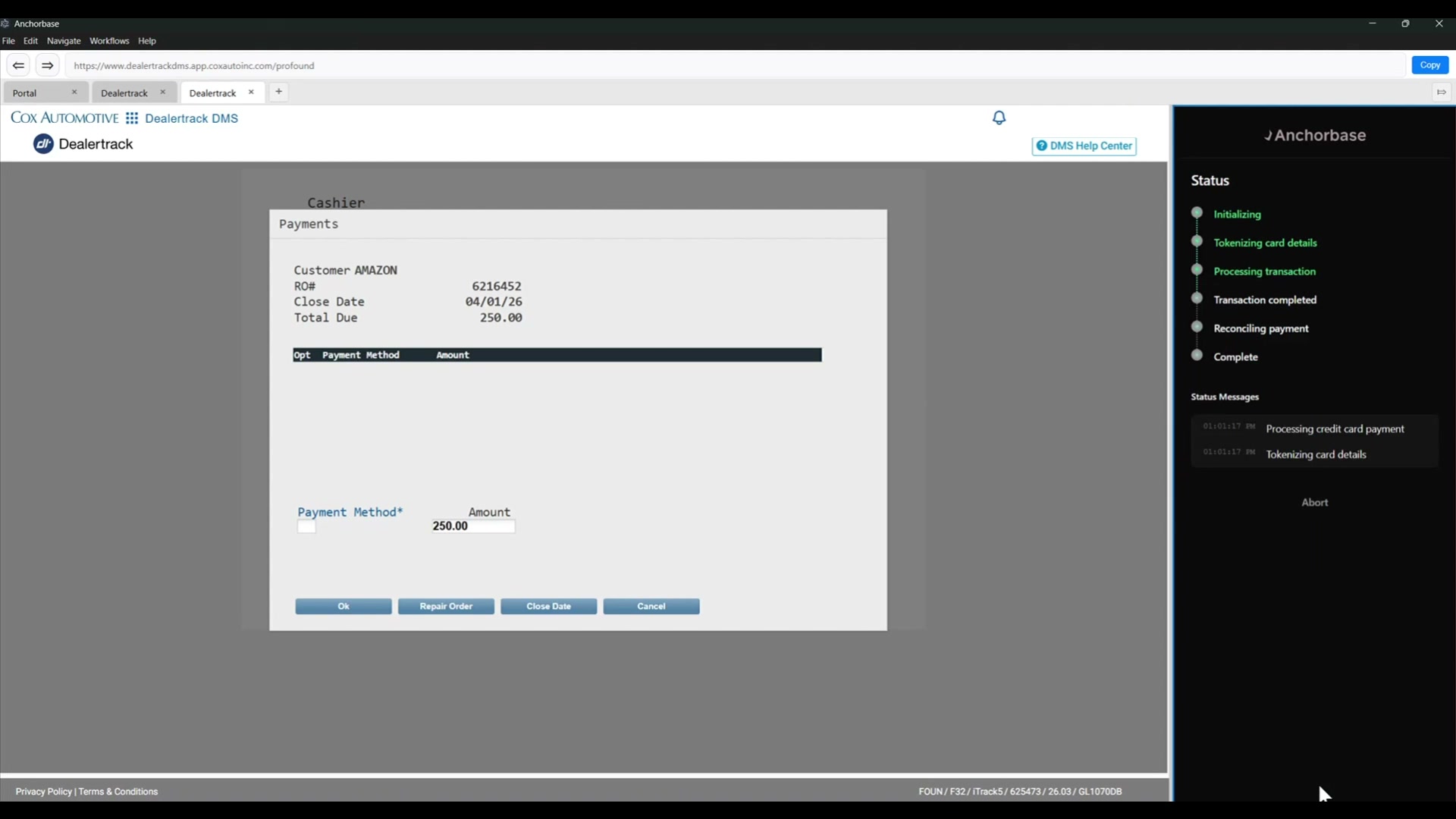
This is where a lot of payment integrations fail. Processing the payment is only half the job. The dealership also needs the payment posted cleanly enough that accounting is not chasing processor reports, terminal batches, and DMS entries at the end of the day.
Anchorbase is designed around that operational reality. The payment can be sent to the general ledger by the employee, or the dealership can configure the transaction to move forward automatically.
Send e-invoices from the DealerTrack workflow
Not every customer is standing at the counter. In the demo, the employee can send an e-invoice directly from the Anchorbase sidebar.
The e-invoice flow carries over the DealerTrack information, including the amount, customer, and RO number. The employee can enter the customer's email, choose delivery options, and send a payment request without rebuilding the transaction in another system.
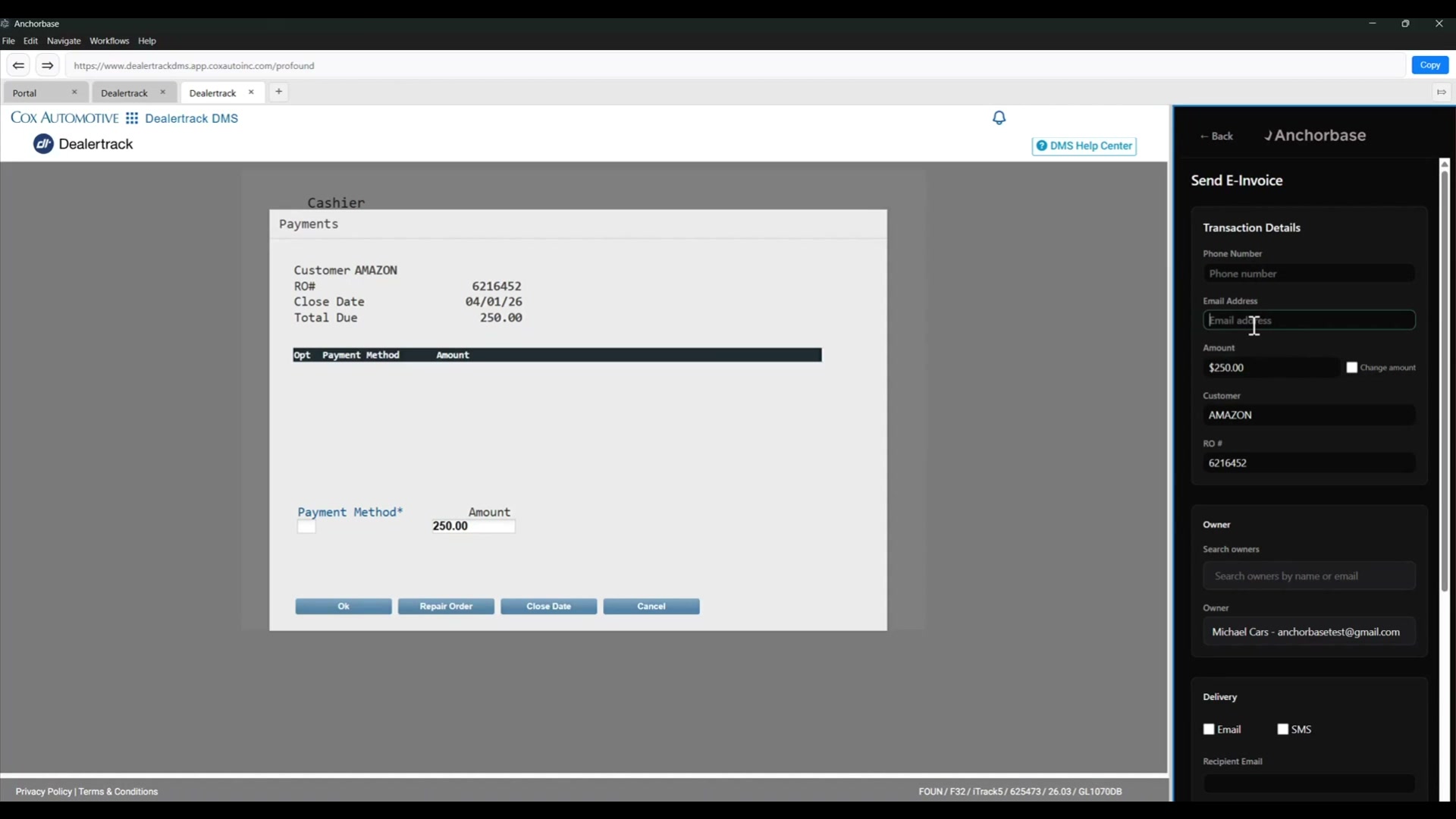
The customer receives an email with the RO number, amount, and a link to pay. They then complete the transaction on a secure hosted payment page and receive confirmation when payment succeeds.
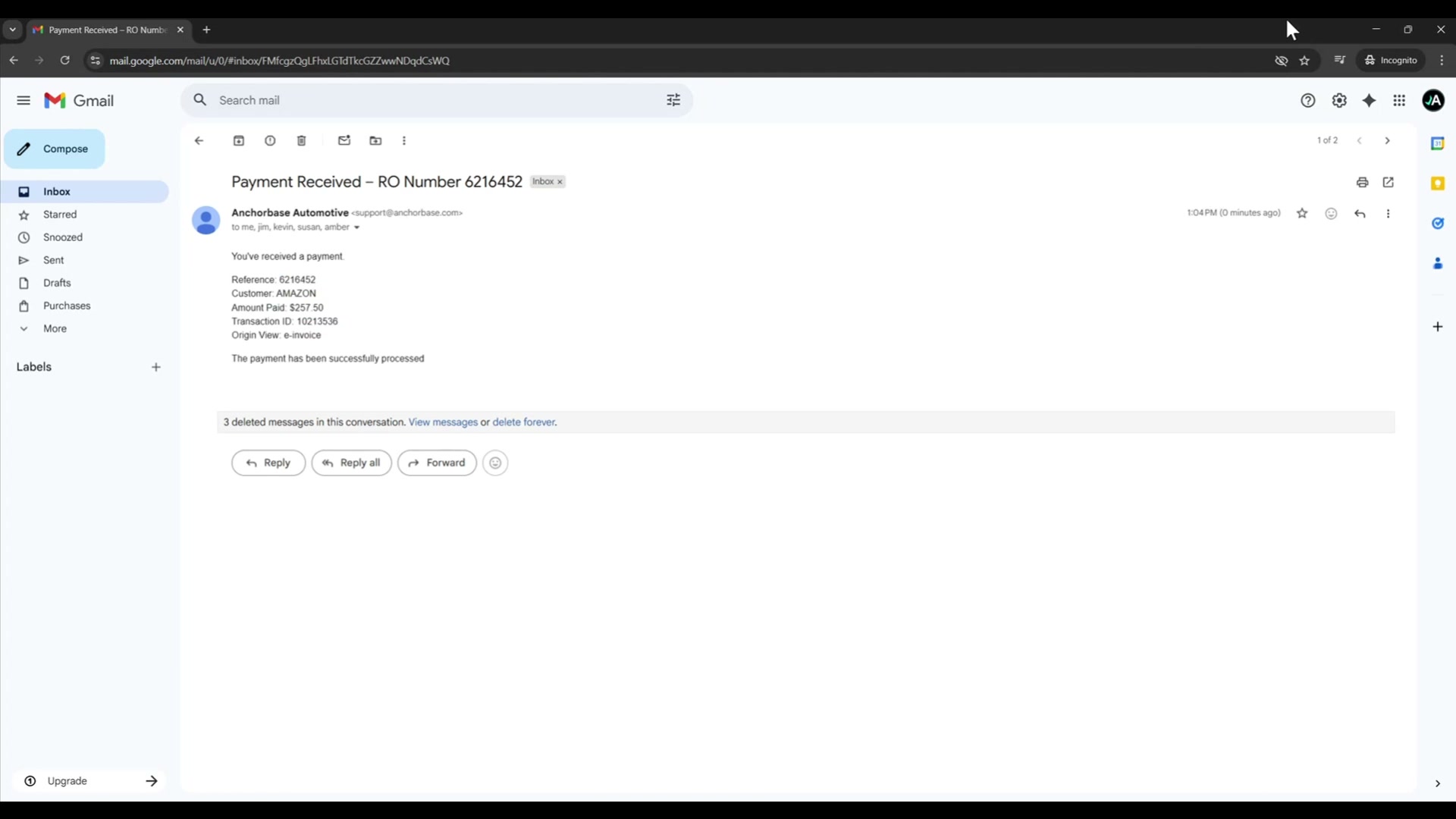
For dealerships, this turns a phone call, voicemail, or manual payment link into a trackable payment request tied to the right DMS transaction.
Reconcile paid invoices back to the general ledger
After the customer pays, the dealership receives a payment notification with the RO number, customer, amount paid, and transaction ID.
The employee can then return to DealerTrack and use Anchorbase to reconcile the paid invoice back to the general ledger. The payment information stays tied to the DMS transaction so the invoice can be closed with the right accounting context.
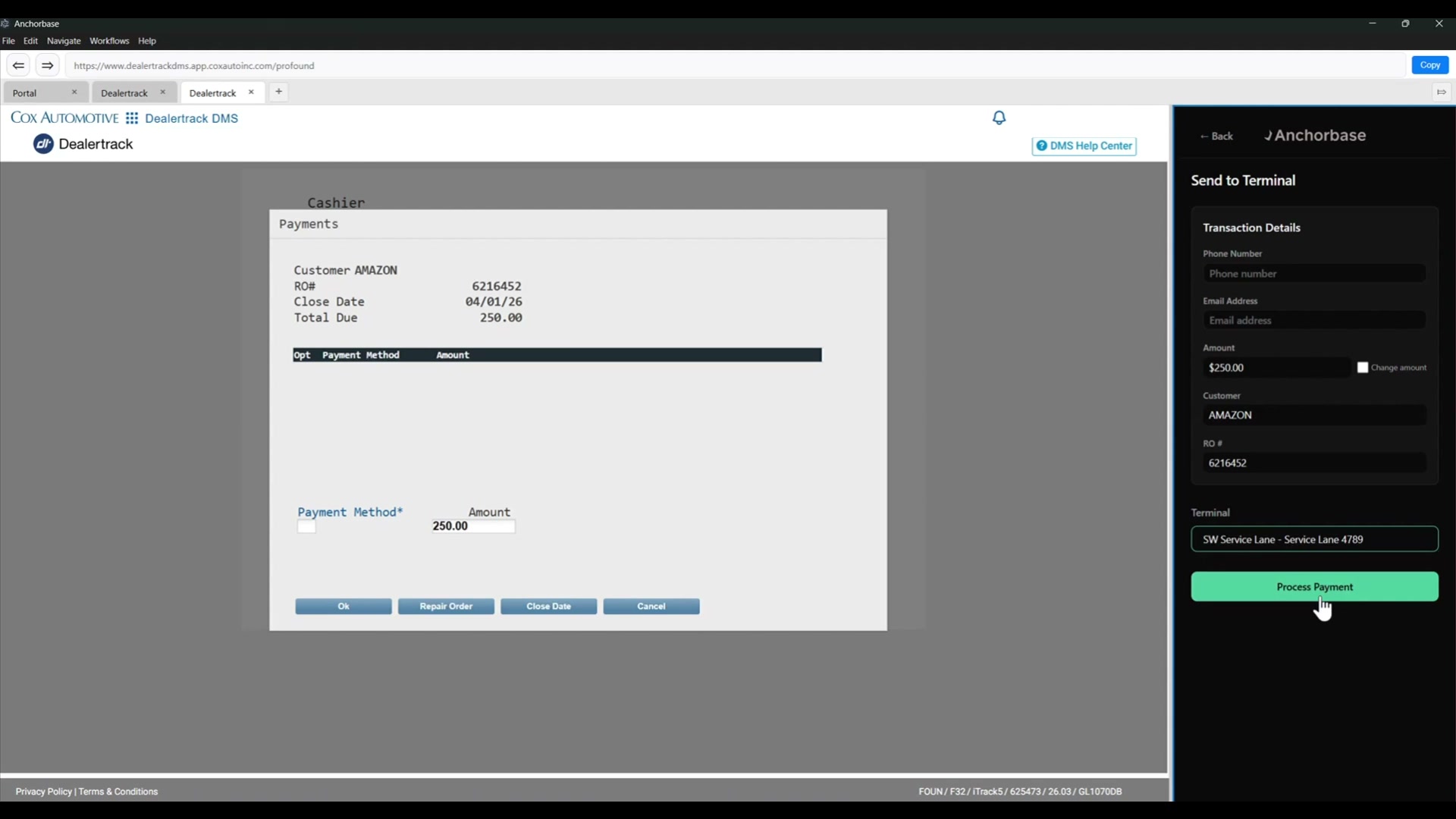
This is the part dealerships should care about most. Modern payment acceptance is useful, but clean reconciliation is the durable business value. If a payment system creates more accounting cleanup, it is not really modernizing the workflow. It is just moving the mess.
What Anchorbase adds to DealerTrack
Anchorbase extends DealerTrack payment workflows with:
- Terminal routing by department, lane, or device
- Card-not-present payment acceptance
- ACH acceptance
- Email and SMS e-invoice payment requests
- Hosted customer payment pages
- Dynamic surcharge handling for credit vs debit
- Permission-based surcharge controls
- Receipts by print, HTML, or PDF
- Payment notifications
- Outstanding payment request tracking
- Payment logs and recent payment history
- DMS writeback for payment method, amount, and approval data
- Reconciliation support for paid invoices and GL posting
The point is not to replace DealerTrack. The point is to make DealerTrack payment workflows feel current without forcing dealership staff into a new operating system.
Why this matters for dealer groups
Dealer groups usually do not have a single payment problem. They have a workflow fragmentation problem.
Service wants faster customer pickup. Parts wants fewer manual terminal entries. Accounting wants clean reconciliation. Management wants lower processing cost and fewer exceptions. Customers want payment options that feel normal.
Anchorbase connects those needs inside the DealerTrack workflow:
- Employees stay in the DMS
- Customers get flexible payment options
- Surcharge logic is handled consistently
- Payment records stay tied to the RO or invoice
- Accounting gets cleaner transaction data
- Dealerships reduce manual reconciliation work
That is the real value of a DealerTrack payment integration: not just taking a card, but making the transaction operationally complete.
DealerTrack payment integration FAQ
Does Anchorbase replace DealerTrack?
No. Anchorbase works alongside DealerTrack. DealerTrack remains the system of record for the dealership workflow, while Anchorbase adds modern payment capabilities and payment data flow.
Can payments be sent to different terminals?
Yes. In the demo, the employee can choose from available terminals, such as a parts device or a service lane device, and send the selected DealerTrack transaction to that terminal.
Can Anchorbase support card-not-present payments?
Yes. Anchorbase supports card entry from the sidebar for phone payments, while keeping the transaction tied to the DealerTrack RO or invoice.
Can Anchorbase handle surcharge logic?
Yes. Anchorbase can apply surcharge behavior based on dealership configuration, card type, user permissions, and applicable rules. Surcharge requirements vary by jurisdiction and card type, so dealerships should treat this as a configurable compliance workflow rather than a generic fee toggle.
Can customers pay online?
Yes. Anchorbase can send an e-invoice by email or SMS and direct the customer to a secure hosted payment page.
Does payment data write back into DealerTrack?
Yes. In the demo, Anchorbase writes back payment method, base amount, and approval number so the transaction can be closed and sent to the general ledger.