What is Integrated Payments? The Complete Guide to Connecting Your Financial Systems
Integrated payments connects your payment processing to your system of record — ERP, accounting software, or operational platform. Learn how to eliminate manual reconciliation and close your books faster.

Integrated Payments Experts

For finance teams tired of reconciling payments manually.
TL;DR
Integrated payments connects your payment processing to your system of record — your ERP, accounting software, or operational platform. Instead of payments living in one system and financial data living in another, integrated payments creates a bridge so transactions flow automatically into the systems where you actually run your business.
The result: real-time visibility, automated reconciliation, and books that close themselves.
What is Integrated Payments?
Integrated payments is the connection between where payments happen and where financial data lives.
Most businesses have a gap: payments are processed through one system (a terminal, gateway, or processor), while the financial record of those payments lives somewhere else (an ERP, accounting platform, or industry-specific software). That gap creates work — manual data entry, reconciliation, reporting discrepancies, and month-end chaos.
Integrated payments closes that gap. When a payment is processed, the transaction data automatically flows into your system of record. No export. No import. No "let me check the other system."
Example: A service advisor closes out a $1,200 repair order for a brake job and timing belt. With integrated payments, the system sends the RO details directly to the payment terminal, the customer taps their card, and the transaction automatically posts back to the DMS — updating the repair order status, recording the payment method, and reconciling against the customer's account. No re-keying. No end-of-day batch. No spreadsheet.
The Problem: Disconnected Payments
Here's how most businesses handle payments today:
- Payment happens — Customer pays via terminal, online checkout, or invoice
- Data sits in processor — Transaction details live in the payment processor's portal
- Manual extraction — Someone exports a report or logs into another system
- Manual entry — Someone re-keys data into the ERP or accounting system
- Reconciliation — Someone compares both systems to make sure they match
- Exceptions — Someone investigates the inevitable discrepancies
This process repeats daily. For businesses processing hundreds or thousands of transactions, it's a full-time job — or several.
The Cost of Disconnected Payments
Time: Finance teams spend 20-40% of their time on manual reconciliation and data entry. That's not analysis, strategy, or decision support — it's copying numbers between systems.
Errors: Manual processes introduce errors. Transposed digits, missed transactions, timing differences. Each error takes 10x longer to fix than it took to create.
Delays: When payment data is manually transferred, there's always a lag. You're making decisions on yesterday's numbers (or last week's).
Audit risk: Disconnected systems create audit trails that don't connect. When auditors ask "show me how this payment ties to this journal entry," you're pulling together screenshots from three different systems.
Opportunity cost: Every hour spent reconciling is an hour not spent on cash flow forecasting, vendor negotiations, or strategic planning.
How Integrated Payments Works
Integrated payments creates a direct connection between your payment processor and your system of record. When a transaction occurs, data flows automatically in both directions.
The Data Flow
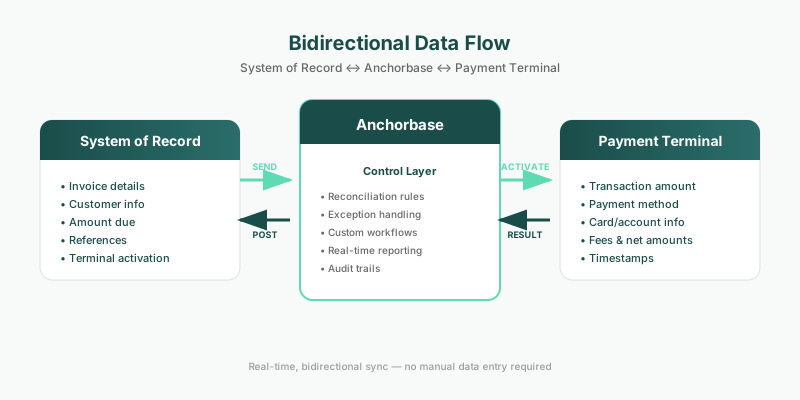
Payment → System of Record:
- Transaction amount, date, and time
- Payment method (card type, ACH, etc.)
- Customer/account information
- Reference numbers and metadata
- Fees and net amounts
System of Record → Payment Terminal:
- Invoice or order details
- Customer information
- Amount due
- Payment terms and references
- Direct terminal activation
This bidirectional flow means your system of record can initiate payments directly to the terminal, and payment results flow back automatically. No swivel-chair. No double-entry.
Integration Points
Integrated payments can connect at multiple levels:
ERP Integration Direct connection to enterprise systems like SAP, Oracle, NetSuite, or Microsoft Dynamics. Payment transactions post as journal entries, cash receipts, or AR applications automatically.
Accounting Software Integration Connection to platforms like QuickBooks, Xero, or Sage. Payments sync as deposits, reducing bank reconciliation to a single click.
Industry-Specific Software Integration Vertical platforms — dealer management systems, practice management software, property management systems — where payments need to update operational records, not just financial ones.
Integrated Payments vs. Other Approaches
Integrated Payments vs. Standalone Processing
Standalone processing: You have a payment terminal or gateway. It processes transactions. You manually reconcile.
Integrated payments: Your payment processing is connected to your business systems. Transactions flow automatically.
The difference isn't the payment hardware or the processor — it's the data connection.
Integrated Payments vs. Embedded Payments
These terms are often confused, but they solve different problems:
Embedded payments is for software companies that want to add payment processing into their product. The software becomes the payment layer. It's a revenue strategy for platforms.
Integrated payments is for businesses that want their existing payment processing connected to their existing business systems. It's an operational efficiency strategy for finance teams.
A software company might embed payments into their platform. Their customers then need integrated payments to connect that platform to their ERP.
Integrated Payments vs. Payment Aggregation
Payment aggregation consolidates multiple payment sources into a single view. You can see all your transactions in one dashboard.
Integrated payments goes further — it pushes that consolidated data into your operational systems automatically. Visibility is step one; integration is step two.
Beyond Integration: The Control Layer
Here's what most "integrated payments" solutions miss: integration is just the plumbing. Once data flows between systems, what can you actually do with it?
True payment integration isn't just about moving data — it's about creating a control layer where you can build workflows, automate actions, and surface insights that neither your payment processor nor your ERP can provide alone.
What Becomes Possible
Custom Reconciliation Rules Your business has specific matching logic. Maybe you reconcile by invoice number, maybe by customer account, maybe by a combination of fields. Generic integration forces you into their logic. A control layer lets you define your own.
Automated Exception Handling When a payment doesn't match, what happens? With a control layer, you can build workflows: route to the right person, apply business rules, auto-resolve common scenarios, escalate edge cases.
Real-Time Reporting Across Systems Your payment processor has reports. Your ERP has reports. But neither has the combined view — payments with full business context. A control layer lets you build reports that span both worlds.
Custom Actions and Triggers Payment received? Automatically update a project status, notify a team, release inventory, or trigger a downstream process. Integration moves data; a control layer acts on it.
Audit Trails That Make Sense Not just "transaction posted" — but why, how, by what rule, with what matching logic. A control layer documents the decision, not just the outcome.
Why This Matters
Most businesses that "integrate" payments are still stuck with rigid, one-way data syncs. Data moves, but nothing intelligent happens with it.
The real value isn't in the connection — it's in what you can build on top of it.
That requires sitting in the middle of both systems, with visibility into payments AND business context. It's not something your payment processor will build (they don't know your ERP). It's not something your ERP will build (they don't know your payments). It requires a purpose-built layer that does both.
The Benefits of Integrated Payments
1. Automated Reconciliation
The #1 benefit. When payment data flows directly into your system of record with proper references and metadata, reconciliation becomes verification rather than investigation.
Instead of: "Does this deposit match these 47 transactions?" You get: "All 47 transactions posted. Confirmed."
Finance teams report 70-90% reduction in reconciliation time with proper integration.
2. Real-Time Financial Visibility
No more waiting for batch uploads, manual exports, or end-of-day processing. When a payment happens, it's reflected in your financial systems immediately.
This matters for:
- Cash flow management — Know your actual position, not yesterday's position
- Customer service — Confirm payments instantly instead of "let me check"
- Decision making — Act on current data, not stale reports
3. Reduced Errors
Every manual touchpoint is an error opportunity. Integrated payments eliminates manual data entry, which eliminates the errors that come with it.
Common errors that disappear:
- Transposed amounts
- Duplicate entries
- Missed transactions
- Incorrect account coding
- Timing mismatches
4. Faster Month-End Close
Month-end close is often delayed by payment reconciliation. When payments are integrated, there's nothing to reconcile at month-end — it's been reconciling continuously.
Businesses with integrated payments typically close 3-5 days faster than those with manual processes.
5. Audit-Ready Records
Integrated payments creates a complete, automated audit trail. Every transaction has a clear path from payment to posting, with timestamps and references at each step.
When auditors ask questions, you have answers — documented, connected, and exportable.
6. Scalability
Manual reconciliation doesn't scale. If you process 100 transactions a day, maybe you can keep up. At 1,000 transactions? 10,000? You need more people, more time, or a different approach.
Integrated payments scales with your business. Whether you process 100 or 100,000 transactions, the integration handles it the same way.
What to Look For in Integrated Payments
Not all "integrated" solutions are created equal. Here's what separates good integration from checkbox integration.
1. Depth of Integration
Shallow integration: Transaction amounts sync. That's it.
Deep integration: Full transaction detail — amount, payment method, fees, reference numbers, customer data, line-item detail — all flow into the appropriate fields in your system.
Ask: What specific data fields are mapped? Can I see a sample transaction in both systems?
2. Bidirectional Data Flow
One-way integration: Payments push to your system.
Two-way integration: Your system also informs payments — sending invoice details, customer info, and references so payments are applied correctly from the start. Better yet, your system can send payment requests directly to the terminal.
Ask: Can payment requests be initiated from my ERP? Do invoice numbers flow through to payment receipts?
How Anchorbase Does This
Anchorbase connects directly to your system of record and your payment terminal. When a service advisor closes an RO or a parts counter rings up a sale, the invoice details are sent straight to the terminal — amount, reference number, customer info, all of it. The customer pays, and the result flows back automatically. True bidirectional integration, not just a one-way sync.
3. Real-Time vs. Batch
Batch integration: Data syncs on a schedule (hourly, daily, etc.)
Real-time integration: Data flows as transactions occur.
For most businesses, near-real-time (within minutes) is sufficient. True real-time matters for high-volume or time-sensitive operations.
Ask: What's the latency between transaction and posting? Is it configurable?
4. Exception Handling
Even the best integration has exceptions — transactions that can't be automatically matched or posted. The question is how those exceptions are handled.
Poor exception handling: Exceptions fail silently or require manual investigation in multiple systems.
Good exception handling: Exceptions are flagged, queued, and resolvable from a single interface with full context.
Ask: What happens when a transaction can't be automatically matched? How are exceptions surfaced and resolved?
5. Partial Payment Support
Real-world payments aren't always clean. Customers pay deposits. Invoices get split. Balances carry forward.
Basic integration: Assumes one payment = one invoice. Anything else breaks.
Robust integration: Handles partial payments gracefully — a $500 deposit on a $2,000 repair order keeps the invoice open with the correct remaining balance, properly linked to both the original order and the deposit transaction.
Ask: How does the system handle deposits and partial payments? Can I see the full payment history against an open invoice?
6. Multi-Entity and Multi-Currency Support
If you operate multiple business entities, locations, or currencies, your integration needs to handle that complexity.
Ask: Can transactions route to different entities automatically? How is currency conversion handled?
Common Objections (And Realities)
"We've always done it manually." And it's always been painful. Manual reconciliation was acceptable when transaction volumes were low and labor was cheap. Neither is true anymore.
"Our systems are too old/complex/custom." Modern integration platforms are built to connect disparate systems. The question isn't whether it's possible — it's whether the ROI justifies it. (It usually does.)
"We already have a payment processor." Integrated payments isn't about switching processors. It's about connecting your existing processor to your existing systems. You keep what works; you fix what doesn't.
"It sounds expensive." Compare the cost to what you're paying now: staff time on reconciliation, error correction, delayed close, audit prep, and the opportunity cost of finance doing data entry instead of analysis.
Getting Started
The first step is understanding your current state:
- How many transactions do you process monthly?
- How many hours does your team spend on payment-related reconciliation?
- What systems need to reflect payment data?
- What's your error rate on manual payment entry?
- How long does payment-related work add to your month-end close?
- What workflows would you build if you had full visibility into both payments and your system of record?
If the answers to those questions are painful — or if that last question gets you excited — integrated payments with a real control layer can help.
Anchorbase isn't just a bridge between payments and your system of record. We're the control layer that makes powerful workflows possible — reconciliation rules, automated actions, real-time reporting, and custom logic that neither your processor nor your ERP can deliver alone.